
These instructions are FOR SYSTEM ADMINISTRATORS ONLY!
This guide describes the time types that can be used in the ems system and how the system administrator can manage them.
When a system is set up, it receives a default set of the most commonly used time types, which the system administrator can later add to or modify.
You can find the Time Types settings window as follows: Time Tracking → Three-dot menu in the upper-right corner → Settings → Time Types (you will be redirected to the old layout) → Time Types tab → Wage Types and Time Types section

To edit the time type, click the edit button (pencil icon) on the right.
CAUTION! Changing time types can affect the accuracy of time tracking. If you are unsure, please contact our support team to request the changes.
The time types “140 Overtime Time Account,” “150 Break Deduction,” and “210 Time Account Compensation” are automatically used by the system to maintain the time account and must not be changed or deleted!
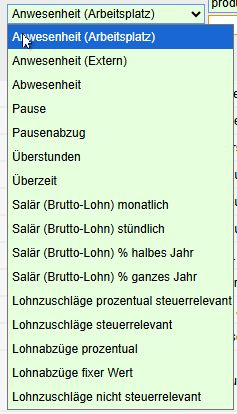
Time and wage types are categorized by the following basic types: attendance, absence, break, overtime, salary, wage premiums, and wage deductions.
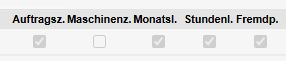
You can specify whether the time type can be recorded for an order and an asset. You can also define whether the time type should be recorded by monthly-paid employees, hourly-paid employees, or external staff.
The time type can have different durations to choose from: by the hour, half-day or full-day, fill-in days, hours only, fixed days, and fixed minutes.
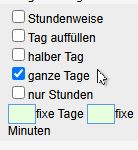
“Fill in the day” is often used for sick leave, while for vacation, half-days and full days are used (a half-day is recorded without reference to a specific time). For maternity and paternity leave, 98 fixed days are entered.
All time types, with the exception of overtime, extended hours, break deductions, and blocked time, have a positive factor of 1.0.
In some companies, different types of time entries and compensation requests can be approved by different people or departments (e.g., vacation requests by a supervisor; sick leave and accident reports by the HR department). ems allows you to record two types of time requests and compensation. To do this, workflow type 1 or 2 must be assigned to each time and compensation type, and workflow 2 must be enabled in the authorization role settings.
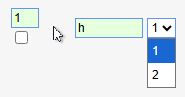
This makes approval processes significantly more flexible and efficient. Read more about this here: Manual Entry and Approval of Corrections,
The S-factor is used for time multipliers: for example, 1.25 represents a 25% multiplier. Otherwise, the value is 1.0.
2 hourly balance groups are assigned only to individual time types:
(1) Vacation
(2) Hour Balance—Overtime Time Account and Compensation Time Account, Time Premium, and Compensation Days