
Skip to content
ems Support Portal

Support Portal

  • English
    • German
Kundenportal
Kundenportal
ems Support Portal
  • Chat
  • Dokumentation ems System
  • Downloads
  • Privacy Policy
  • Quick Download Button
  • Register
  • System status

Getting Started For Users

7
  • Basic Operation of the ems Time App
  • Basic operation of ems Mobile
  • Basic operation ems Web
  • Using time recording
    • Time recording terminals
  • Managing your user account
    • Article favorites
    • Set up and manage user account
    • Personal layout settings

Administration & Settings

14
  • Create checklists
  • Employee and user administration
    • User overview
    • Notifications
    • Create new employee profile
    • Authorizations (General)
    • Authorizations for employees
    • Store authentications in the ems system
  • System settings
    • Clients / Multiside
    • QR code and NFC for ems Mobile
    • Notifications
    • Text templates for notifications (e-mails)
    • Images, logos and symbols (icons)
  • Importing and exporting data
    • Exporting data
    • Importing data

News, Updates & Technology

25
  • ems licensing
  • Initialize and set up new system
  • New web layout X3
  • Time and data recording terminals
    • Protected: Technical information on terminals
    • Datafox Terminals
    • ems terminals (TT5, MT7)
  • Software installation
    • Install the ems Timekeeping app (time tracking) on your smartphone
    • Infrastructure requirements for the system
    • ems Installation Tool
    • Configure ems Server Tool
    • ems Mobile on the smartphone
    • ems Client
    • Protected: Presentation systems
  • Integrations & interfaces
    • Protected: API for RESSIS / ARVIS
    • User parameters
    • System parameters
    • Public web services
    • Interfaces
    • Protected: API access (Rest web service)
    • Protected: API for SUGB inspection app
    • Mailjet connection (for campaigns)
    • WooCommerce connection
    • 3CX telephone system
    • Set up your own e-mail server
    • Protected: API for ems Pos App

Time Tracking

34
  • Working time recording
    • Time Tracking (ems Web X3.0)
    • Track and Edit Time (ems Time App)
    • Manual entry and approval of corrections
    • Record and edit times (ems Mobile)
    • Own hours and vacation balances (ems Web)
    • Approval of Your Own Time Tracking (ems Web)
    • Time recording (ems Web)
    • Time Tracking and Time Requests via Quick Panels (ems Web)
    • Hourly and vacation balances (ems Web)
    • Hourly and vacation balances (ems Mobile)
    • Release of time recording (ems Mobile)
    • General warning and error messages
  • Absence management
    • Record and Process Time Requests (ems Time App)
    • Own hours and vacation balances (ems Web)
    • Enter time requests (ems Web)
    • Time Tracking and Time Requests via Quick Panels (ems Web)
    • Hourly and vacation balances (ems Web)
    • Hourly and vacation balances (ems Mobile)
    • Enter and edit time requests (ems Mobile)
  • Bonuses and overtime calculation
    • Time Credit (Vacation, Flexible Work Hours)
  • Compensation
    • Record and Process Reimbursements (ems Time App)
    • Record Compensation (ems Web)
    • Record and process compensation (ems Mobile)
  • Share and Lock
    • Visa Revocation
    • Warning and Error Messages During Release
    • Canceling Approved Time Requests
    • Approval of time requests
    • Approval of Employee Reports
    • Error Messages When Approving Time Requests
    • Approving Time Requests, Time Entries, and Compensation (ems Web) – Instructions for Supervisors
    • Approving Time Entries (ems Time App)
  • Time Settings
    • Time Credit (Vacation, Flexible Work Hours)
    • Break Policy
    • Target hours (target timetables / public holidays)

Customer & Address Management

13
  • Customer management
    • Customer networks
    • Enter new customer address (ems Web)
    • Manage customer addresses
    • Copy customer address
    • Difference between customer groups, properties, authorization roles and relationships
    • Authorization roles for customers
    • 3CX telephone system
    • Importing customer data
    • Mailjet connection (for campaigns)
  • Supplier management
    • Manage supplier addresses
    • Enter and edit supplier address
    • Authorization roles for suppliers
    • Copy supplier address

Orders & Sales

23
  • Quotation creation
    • Create and manage offers
    • Offer settings
  • Order management
    • Shift planning for the customer order (ems Web)
    • Enter new customer order
    • Time and compensation recording for the customer order (ems Web)
    • Order status, billing, order completion
    • Payment plan (recurring invoices)
    • Record material (ems Web)
    • Checklists for the customer order (ems Mobile)
    • Record services (ems Web)
    • Record material (ems Mobile)
    • Time and compensation recording for customer orders (ems Mobile)
    • Processing a customer order (ems Mobile)
    • Authorizations for customer orders
    • Checklists for the customer order (ems Web)
    • Record services (ems Mobile)
    • Completing the customer order (ems Mobile)
    • Create checklists
    • Clearing types
  • Point of Sale (POS) System
    • Process sales orders (via tablet – ems Mobile)
  • Marketing Campaigns
    • Campaign rules
    • Create marketing campaigns
    • Manage marketing campaigns

Procurement & Logistics

8
  • Product & Article Management
    • Special food labeling
    • Article bundles
    • Article variants
    • WooCommerce connection
    • Importing article master data and article prices
    • Manage articles
    • Article types
    • Create and edit articles

Finance & Accounting

6
  • Accounts payable management
    • Receive creditors via e-mail
    • Scan vendor invoices
  • Accounts receivable management
    • External recording (other software)
    • Delete or cancel invoices
    • Take over positions
    • Enter invoices

HR & Payroll

6
  • Employee administration
    • User overview
    • Employee resignation
    • Edit employee profile
    • Create new employee profile
    • Authorizations for employees
  • Payroll
    • Set up and adjust payroll accounting

Planning & Resource Management

5
  • Personnel deployment planning
    • Creating a mission entry
    • Views of resource planning (ems Web)
    • Operations planning overview (ems Mobile)
    • Planning groups
    • Authorizations for resource planning

Document Management & Administration

2
  • Outlook signature
  • Add documents via DragDrop
  • Dokumente
  • Getting Started For Users
  • Using time recording
  • Time recording terminals
View Categories

Time recording terminals

Ungefähre Lesedauer: 1 min lesedauer

Datafox Evo 2.8 / 3.5 Pure time recording terminal #

The following operation refers to the standard configuration of SUBRIS. Customer-specific adaptations may lead to a change in operation.

Detailed instructions for the operation and setup of the terminals by the administrators can be found here: Datafox Terminals

Functions #

Coming, going and break #

  • Select the relevant function (“Come”, “Go” or “Pause”) on the display or using the buttons
  • Identify yourself using your batch or other means of identification (e.g. fingerprint)
  • Wait for confirmation from the terminal.

Stamping (only on older terminal models) #

  • Select the “Stamp” function on the display or using the buttons
  • Identify yourself using your batch or other means of identification (e.g. fingerprint)
  • Wait for confirmation from the terminal. The terminal decides independently whether it is “coming” or “going” based on the last saved booking.

Balance #

  • Select the “Balance” function on the display or using the buttons
  • Identify yourself using your batch or other means of identification (e.g. fingerprint)
  • The display shows the current balances from the previous day.

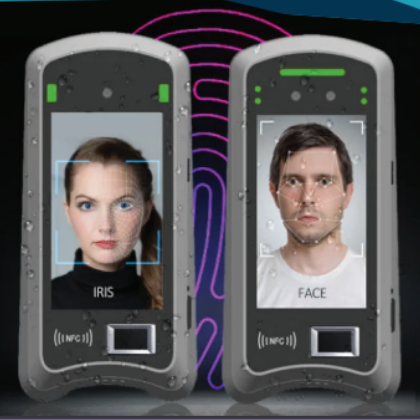
ems time recording terminals TT5 and MT7 #
Terminal operation #

Detailed instructions for the operation and setup of the ems terminals by the administrators can be found here: ems Terminals (TT5, MT7)

The terminal interface of the ems TT5 and MT7 time recording terminals is intuitively designed.

Depending on the configuration of the terminal, the following buttons are visible: Come, Go, Break, Info, Time requests, Compensation

Record working time #

  • Select the relevant function(come, go or pause) on the display
  • Identify yourself using your batch, fingerprint, facial recognition or PIN (depending on which identification methods you have been assigned)
  • Wait for confirmation from the terminal.

After successful time recording, the green confirmation tick appears.

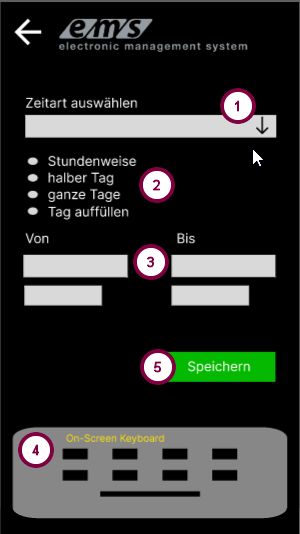
Create time requests #

The terminal allows you to enter/apply for time requests (vacation, other stored absences).

  • Click on Time search on the start interface
  • Identify yourself
  • In the screen that opens, select the desired time type (1), the recording type (hourly, half day, full day, fill up day) (2), enter the date and, if necessary, the time (3) using the keyboard (4) and click on Save (5).
Recording compensation #

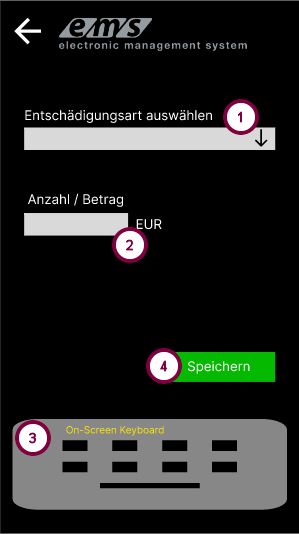
Employees can also record their compensation at the ems terminal.

  • Click on Compensation on the start interface.
  • Identify yourself
  • In the next screen, select the compensation type from the list (1), enter the amount (2) using the keyboard (3) and confirm with Save (4).

If the selected compensation type has a fixed stored value, this appears automatically in the amount field. If the amount value has a predefined value range, only a value within this range is accepted.
Balance #

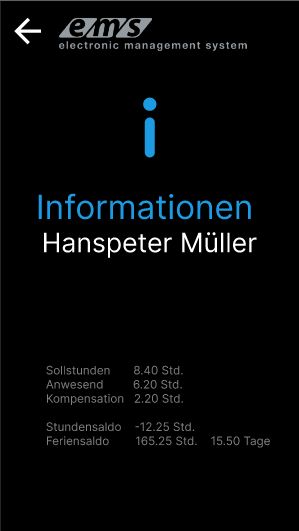
Clicking the information button displays information about the current day as well as the hours and vacation balance as of the previous day of the registered employee.
Internal user
War dieser Artikel hilfreich für Sie?
Stecken Sie immer noch fest? Wie können wir helfen?

Wie können wir helfen?

Updated on 6. May 2025
Inhaltsübersicht
  • Datafox Evo 2.8 / 3.5 Pure time recording terminal
    • Functions
      • Coming, going and break
      • Stamping (only on older terminal models)
      • Balance
  • ems time recording terminals TT5 and MT7
    • Terminal operation
    • Record working time
    • Create time requests
    • Recording compensation
    • Balance

  • Privacy Policy